
Discover the latest in virtual design technology with the introduction of PBR (Physically Based Rendering) Materials now available to Second Life residents. This innovative feature has captivated designers and builders by enabling real-time reflections within the immersive world of Second Life, making virtual environments more realistic than ever.
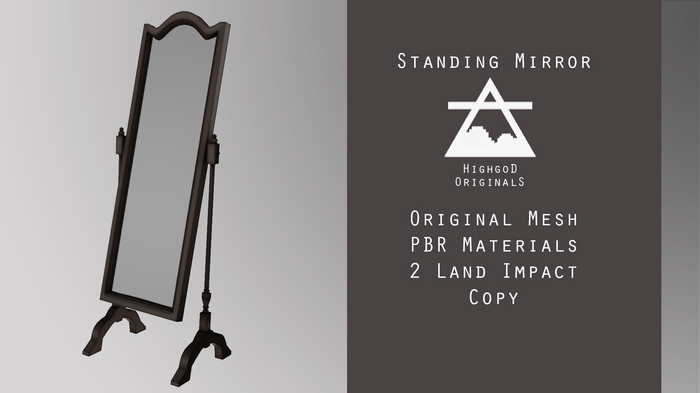
In light of this graphic enhancement, Highgod Originals is thrilled to announce the update of their popular products: the Highgod Wall Mirror Set and Standing Mirror Set. These reimagined products are available in the Second Life Marketplace as the Highgod Wall Mirror PBR and Standing Mirror PBR. Each mirror now includes a PBR reflective material, offering users an authentic real-time reflection akin to a mirror in the real world.

The Highgod Wall Mirror and Standing Mirror are crafted in four distinct stained wood finishes, providing flexibility to match any virtual decor. With a low land impact of just 1 – 2, these mirrors are not only visually stunning but also resource-efficient.
Upgrade your Second Life environment today and experience the true magic of PBR materials. Enhance your virtual space by visiting the Second Life Marketplace and exploring Highgod Originals’ PBR mirror collection.
Step-by-Step Guide to Activating Real-Time Reflections on Second Life Servers
To enable real-time reflections in Second Life, ensure you are operating on a compatible server. The recommended choices are the Second Life – Linden Labs server or Firestorm Viewer.
Note that some of these advanced features may not be active by default. Here’s how to manually enable them in your graphics settings:
- Second Life Server:
- Access your graphics settings by navigating to the ‘Me’ tab.
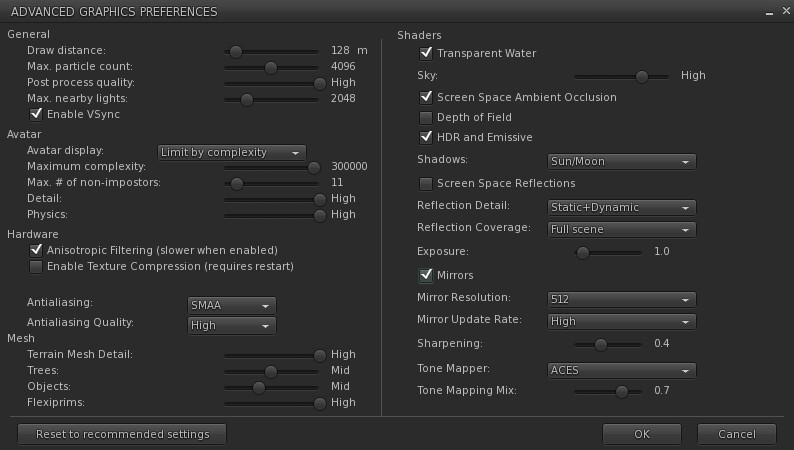
- Proceed to Preferences > Graphics > Advanced Settings.
- Firestorm Viewer:
- Locate your graphics settings within the ‘Avatar’ tab.
- Navigate to Preferences > Graphics.

- In the Shaders section, make sure to enable Mirrors.
- Adjust the Reflection Detail to ‘Realtime’ or ‘Static and Dynamic’ for optimal performance.
- Customize your Mirror Resolution and Mirror Update Rate to achieve the best visual experience suited to your preferences.
Remember, saving these adjustments as new graphic settings will help you maintain your preferred setup.

Once configured, you can fully enjoy your Highgod Wall Mirror and Standing Mirror PBR with enhanced reflective features.
Are you curious about the designer’s insights and the creative process behind the Highgod Wall Mirror PBR and Standing Mirror PBR? Subscribe to Becoming Originals for exclusive access to in-depth details and behind-the-scenes content on these innovative products.
Highgod Originals YouTube Channel

Stay connected and get insight on Highgod Original virtual ventures and products by subscribing to the YouTube Channel
Follow Highgod Originals on PrimFeed


 Highgod Originals